· by Jason Miller
Using Ansible to push new VXLAN VNIs
Cisco Tech Ansible BGP Network Automation NX-OS VXLAN
Going with the same diagram i’ve been using. I’m going to configure an ansible playbook to push out new VNIs to my VXLAN lab
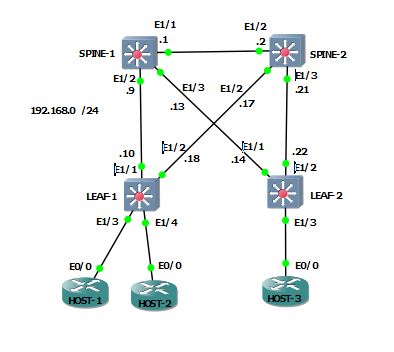
You can see i only have L2 VNIs 100 and 200, and L3 VNI 1000 configured.
LEAF-1# sh nve vni
Codes: CP - Control Plane        DP - Data Plane
       UC - Unconfigured         SA - Suppress ARP

Interface VNI      Multicast-group   State Mode Type [BD/VRF]      Flags
--------- -------- ----------------- ----- ---- ------------------ -----
nve1      100      239.1.1.1         Up    CP   L2 [100]           SA
nve1      200      239.1.1.1         Up    CP   L2 [200]           SA
nve1      1000     n/a               Up    CP   L3 [HQ]
I’ve added my leafs to my /etc/ansible/hosts file under “LAB_LEAFS”. Below is the contents of my template file
vlan {{ item.vlan }}
 vn-segment {{ item.vni }}
!
int vlan {{ item.vlan }}
 vrf member HQ
 ip address {{ item.ip_address }}
 fabric forwarding mode anycast-gateway
 no shut
!
int nve1
 member vni {{ item.vni }}
  suppress-arp
  mcast-group 239.1.1.1
  exit
exit
!
evpn
  vni {{ item.vni }} l2
    rd auto
    route-target import auto
    route-target export auto
And here is the playbook which I call with arguments for vni, vlan, and ip_address
- name: BUILDING CONFIG
  hosts: localhost
  connection: local
  gather_facts: false
  vars:
        VNI:
                - {
                        ip_address : "{{ ip_address }}",
                        vni : "{{ vni }}",
                        vlan : "{{ vlan }}"
                   }
  tasks:
          - name: Building Config for leafs
            template: src=TEMPLATES/leaf_add_vni.j2 dest=CONFIG/ADD_VNI.cfg
            with_items: "{{ VNI }}"

- name: PUSHING CONFIG
  hosts: LAB_LEAFS
  connection: local
  gather_facts: false
  tasks:
           - name: Pushing Config to leafs
             nxos_config:
                     src=CONFIG/ADD_VNI.cfg
Running the playbook
BOX$ ansible-playbook playbook.yml -e "ip_address=192.168.30.1/30 vlan=300 vni=300" --ask-pass
SSH password:

PLAY [BUILDING CONFIG] ************************************************************************************************************************************************************************************************

TASK [Building Config for leafs] **************************************************************************************************************************************************************************************
ok: [localhost] => (item={u'vlan': u'300', u'ip_address': u'192.168.30.1/30', u'vni': u'300'})

PLAY [PUSHING CONFIG] *************************************************************************************************************************************************************************************************

TASK [Pushing Config to leafs] ****************************************************************************************************************************************************************************************
changed: [LEAF-2]
changed: [LEAF-1]

PLAY RECAP ************************************************************************************************************************************************************************************************************
LEAF-1                     : ok=1    changed=1    unreachable=0    failed=0
LEAF-2                     : ok=1    changed=1    unreachable=0    failed=0
localhost                  : ok=1    changed=0    unreachable=0    failed=0
We now have VNI 300 deployed
LEAF-1# sh nve vni
Codes: CP - Control Plane        DP - Data Plane
       UC - Unconfigured         SA - Suppress ARP

Interface VNI      Multicast-group   State Mode Type [BD/VRF]      Flags
--------- -------- ----------------- ----- ---- ------------------ -----
nve1      100      239.1.1.1         Up    CP   L2 [100]           SA
nve1      200      239.1.1.1         Up    CP   L2 [200]           SA
nve1      300      239.1.1.1         Up    CP   L2 [300]           SA
nve1      1000     n/a               Up    CP   L3 [HQ]
!
LEAF-1# sh run int vlan 300
interface Vlan300
  no shutdown
  vrf member HQ
  ip address 192.168.30.1/30
  fabric forwarding mode anycast-gateway